Clipdiary
Take full control over your clipboard history
Get Clipdiaryv. 5.7 December 10'21 Get Portable
v. 5.7 December 10'21
Save and reuse your Clipboard History
Clipdiary is a powerful clipboard manager, which records every piece of data that goes to the Windows clipboard, meaning that you can easily retrieve any information that was once copied to the clipboard.
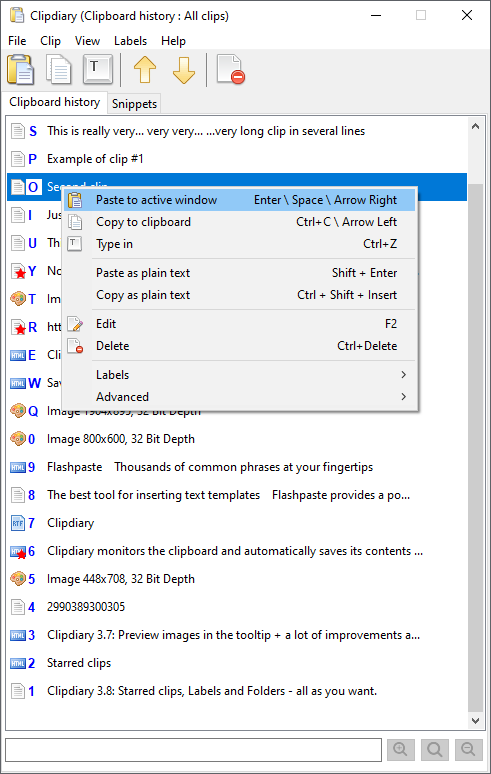

Main features
- Clipdiary monitors the clipboard and automatically saves its contents to the clipboard history
- Work with text, links, images, files, and all other clipboard formats
- Supports Starred Clips and Labels. Mark clips as important and use Labels to organize them into folders
- Snippets - often used text templates for quick pasting.
- The clipboard history remains between reboots
- You can retrieve the data stored in the clipboard history whenever you need to, even after many years
- Database encryption support (AES-256)
- Clipdiary is free to use under the following conditions...
You can
- Insert saved data directly into any application
- Fast copy data back to the clipboard
- Paste text without formatting (as plain text)
- Find data you once copied to the clipboard
- View the list of clips in the clipboard history viewer window
- Recover data accidentally replaced in the clipboard
- Improve your productivity and save lots of time with our clipboard manager
Top 10 Reasons To Use Clipboard History and Clipdiary
Also
- Unlimited clipboard history
- Advanced search
- Multipasting (F6)
- Quick Copy next or previous clip using only hot keys
- Smart Capture
- Pasting clipboard content as plain text
- Filtering application, format, and hotkeys in an application
- Cleanup wizard
- Moving clips in the list
- Editing the title of a clip (F2)
- Preview images (F8)
- Export clips to file
- Support of the Clipboard Viewer Ignore Format
- Search for text of the clip in a web browser (Alt+G)
- Fully customizable behaviour and interface
- Portable version