Clipboard manager with history and snippets for frequently used text
Work faster and more efficiently
Beta version
Take full control over your clipboard history
Backup for your clipboard
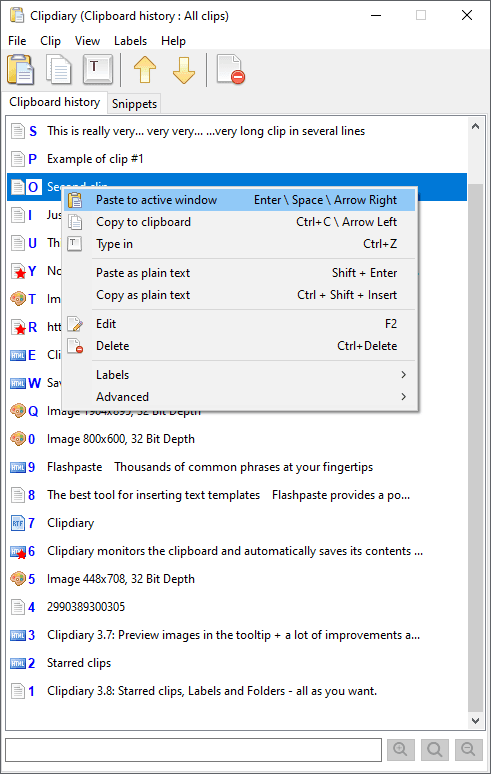
Clipdiary monitors the clipboard and automatically saves its contents to the clipboard history. You can retrieve the data stored in the clipboard history whenever you need to, even after many years.
Organize your data
Mark important clips with stars and use labels to organize your clipboard history into folders.
Secure
Your clipboard history stays on your computer. Protect your data with a password using AES-256 database encryption.
The Windows clipboard holds the most recently copied item. Windows 10 and 11 also offer a built-in clipboard history, but it has limits. Clipdiary helps you keep and organize a much larger history for long-term use.
In most cases, that isn't a problem, but have you ever needed the text you copied 30 minutes or an hour ago? Maybe your computer is acting up and the program you are using hasn't saved the data, or maybe you copied some interesting information from a web page, but got distracted and forgot to paste it where you wanted? Or you may simply want to recall what you were doing on your computer a month or a year ago. There are many cases in which you might want to review your clipboard contents.
We have a solution: Clipdiary can run at Windows startup and save copied data to its database. Clipdiary can log clipboard history and record data in several formats: plain text, RTF (Rich Text Format) and images (BMP), HTML, files, and more. So, besides saving text fragments, you can take a series of screenshots and let Clipdiary save them for you.
Top 10 reasons to use clipboard history and ClipdiarySave time with snippets for frequently used text
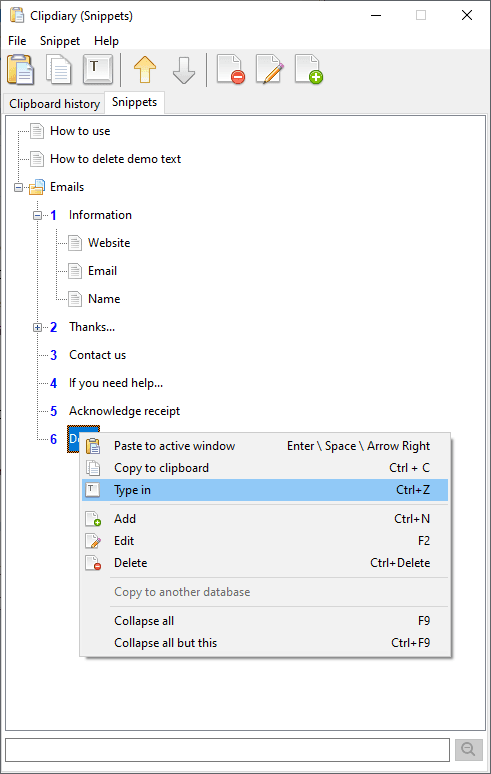
Store frequently used text as snippets: standard replies, addresses, code, or any other text you use regularly. Keep your snippets organized in one place and paste them in just a few clicks, saving time and reducing typing errors.